A meeting alarm for your Android phone
Minute Early is an Android app that rings like an alarm clock one minute before each meeting in your phone’s calendar, with a big Join button.
Coming soon to Google Play
Free to download. No account. For Android 8 and later.
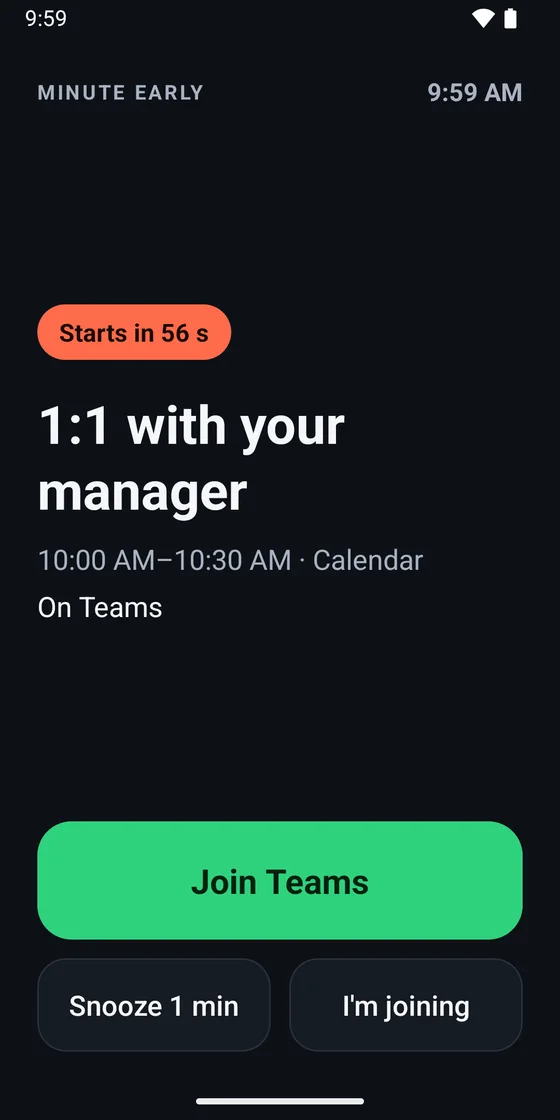
It rings a minute before, so you’re not late
For the stand-up, the 1:1 with your manager and the team catch-up: the meetings you don’t want to miss because your phone’s little reminder slipped by.
Pick your calendars
Minute Early uses the calendars already on your phone, like Outlook, Google or Samsung. There’s nothing to sign in to.
It rings a minute before
A loud alarm fills the screen, even when your phone is locked or on silent. It rings for 2 minutes, or until you tap a button.
Tap Join
Join opens the meeting in Teams, Zoom, Google Meet or Webex. Need a moment? Tap Snooze 1 min. On your way? Tap I’m joining.
What it looks like
Real screens from Minute Early, with a made-up work week.
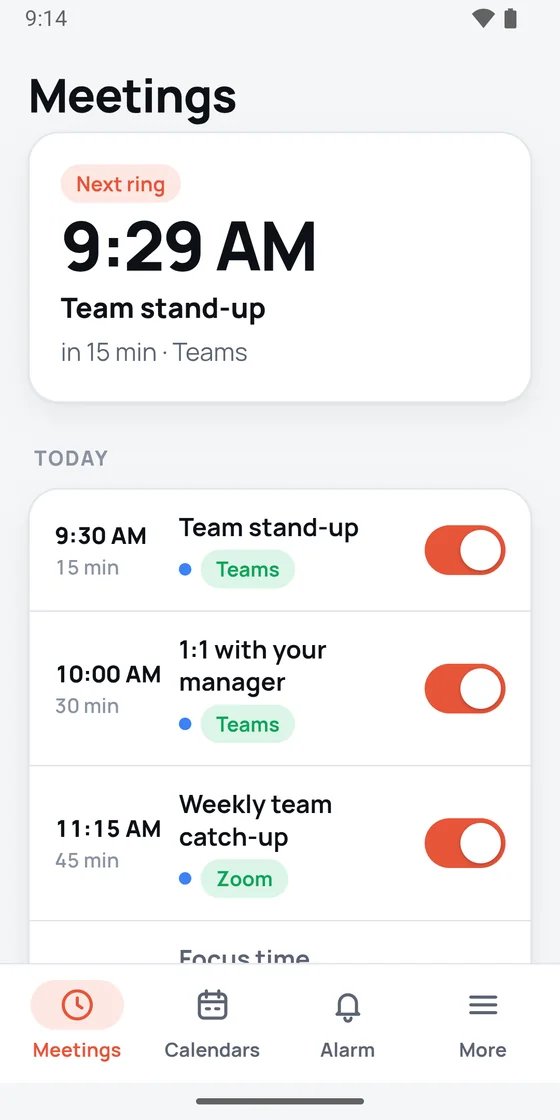
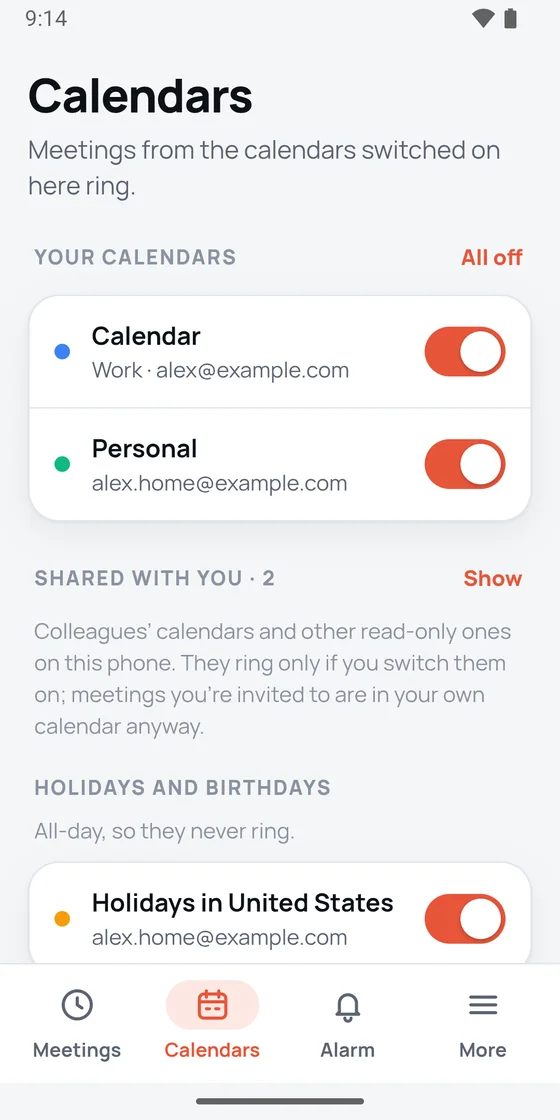
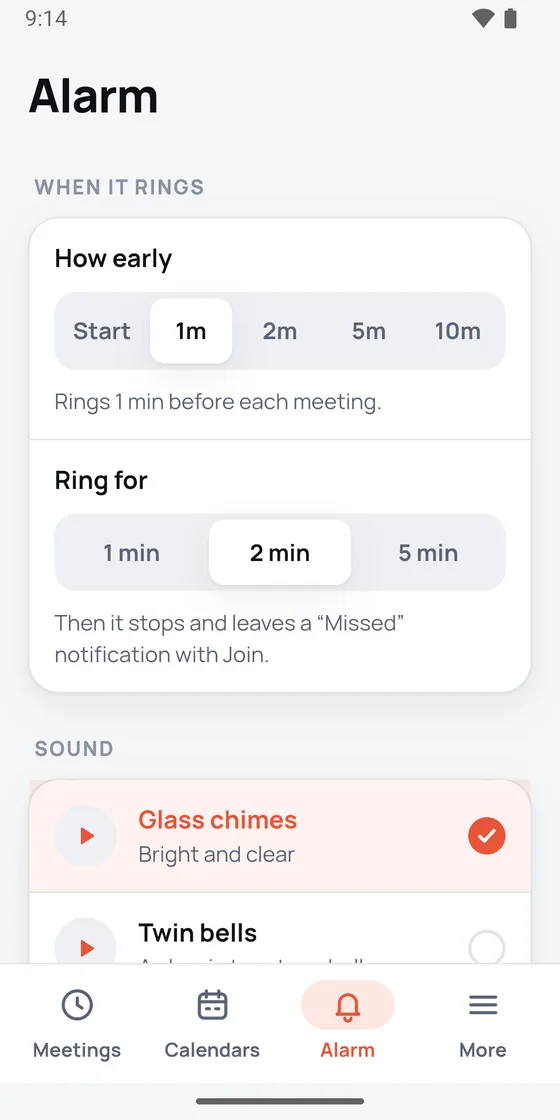
Swipe to see more screens.
Works with the apps you already use
If your meetings show up in your phone’s calendar app, Minute Early can ring for them.
Your calendar
Outlook, Google Calendar, Samsung Calendar and Exchange
Using Outlook? Switch on Outlook’s Sync calendars setting and your Teams meetings ring too. The app shows you how, and so does our Outlook guide.
Your meeting app
Teams, Zoom, Google Meet and Webex, and also GoTo Meeting, Jitsi and Whereby
Join opens the meeting’s link in its own app. Meetings without a link still ring, just without Join.
Free, with an optional Premium
Everything is free for your first 14 days, with no card needed. After that, every meeting still rings. Premium adds more control.
Free
For as long as you like
- Every meeting rings, 1 minute before, for 2 minutes
- Join, Snooze 1 min and I’m joining
- A “Missed” notice with Join, if you didn’t answer
- Choose your calendars, skip any meeting, pause all rings
Premium
US$0.99 a month or US$7.99 a year
- Choose which meetings ring: video meetings only, work hours only, skip invites you haven’t accepted, and more
- All 8 alarm sounds
- How early it rings: at the start, or 1, 2, 5 or 10 minutes before
- How long it rings: 1, 2 or 5 minutes
Prices are for the US. Google Play shows the price for your country before you buy, and you can cancel any time in Google Play.
Your calendar stays on your phone
The app reads your calendar on your phone to know when to ring. Nothing is sent to us or anyone else.
- No account and no sign-in
- No ads and no tracking in the app
- No internet access, so it can’t send your meetings anywhere
- It can read your calendar, but it can’t change it
Questions people ask
Is there an iPhone version?
No. Minute Early is for Android phones only, from Android 8 onwards.
Does it work with Outlook and Teams?
Yes. Outlook keeps its calendar to itself until you switch on Sync calendars in Outlook’s settings (tap your account, then Sync calendars), and Minute Early shows you the taps. Teams meetings are in your Outlook calendar, so they ring too. Some companies block this on work phones: if the switch is missing or greyed out, ask your IT team.
Does it ring when my phone is on silent?
Yes. It rings like an alarm clock, at alarm volume, even on silent and on the lock screen. Do Not Disturb lets alarms through on most phones unless you’ve changed that.
Does it still ring after my phone restarts?
Yes. It puts the next ring back after a restart, even before you unlock the phone, and after an update or a time zone change.
Which meetings ring?
Meetings with a start time in the calendars you switch on. All-day events, cancelled meetings, ones you declined and events marked free (like focus time) don’t ring. Each meeting has its own switch, so you can skip one.
What does it cost?
Nothing to start: everything is unlocked for your first 14 days, with no card needed. After that, every meeting still rings for free, 1 minute before and for 2 minutes. Premium adds the choice of which meetings ring, all 8 sounds, and how early and how long it rings, for US$0.99 a month or US$7.99 a year in the US. Google Play shows the price for your country.
Will I get two reminders for the same meeting?
You might, because your calendar app reminds you too. Phone setup in Minute Early opens that app’s notification settings, so you can turn its reminders off there.
Does it need the internet?
No. Minute Early has no internet access at all. When you tap Join, it hands the meeting link to Teams, Zoom, Google Meet or your browser, and they connect as usual.
What if a meeting has no link?
It still rings. You just won’t see the Join button, because there’s nothing to join.
Help with meeting reminders on Android
Step-by-step guides that help whether you use Minute Early or not.
How to make Google Calendar ring like an alarm on Android
Google Calendar has no alarm setting. How to make its reminders louder and harder to miss, step by step.
Read the guideOutlook meeting reminders on Android: why they don’t show and how to fix it
Notifications, battery limits, Do Not Disturb and meetings with no reminder: what to check, in order.
Read the guideTeams meeting reminders on your phone
Teams tells you when a meeting has started. How to get a reminder before it starts, on Android.
Read the guideNever miss a meeting when you step away from your laptop
Your laptop’s reminder pops up on an empty desk. How to get one on your phone that you’ll notice instead.
Read the guideGet Minute Early
Minute Early is being tested now. It comes to Google Play soon, for Android 8 and later.
Coming soon to Google Play